Affiliate disclosure: This article contains affiliate links. Prop Firms Compare may receive a commission if you sign up through one of our links, at no extra cost to you. This does not change our analysis. Always check each prop firm’s latest rules before connecting a trade copier, placing trades, or purchasing a challenge.
How to Manage Multiple Prop Firm Accounts
Managing one prop firm account is difficult enough. Managing three, five or ten funded accounts is a completely different game.
The challenge is not only finding good trades. The bigger challenge is controlling execution risk, drawdown limits, account-specific rules, payout schedules, trading platforms, symbol differences, position sizing, and emotional pressure across every account at the same time.
A trade copier can make this easier, but it can also create serious problems if you use it with the wrong firm, the wrong settings, or the wrong risk model. Copy trading between your own accounts may be allowed by some firms under specific conditions, while other firms restrict it or ban certain cloud-based copy tools. For example, FundedNext’s current help-centre wording says cloud-based copy trading services, including Traders Connect, are not allowed for its CFD programme, while Alpha Capital allows copy trading under strict ownership and account-verification requirements.
So the short answer is this: the safest way to manage multiple prop firm accounts is to build an account map, verify each firm’s copy-trading rules, use one master execution process, cap risk per trade idea rather than per account, monitor total exposure, and review your results across all accounts weekly.
If your firms allow it, a cloud-based copier such as Traders Connect can help you mirror trades from one master account to multiple accounts, apply risk settings, use symbol mapping, set trading hours, and monitor copied executions. Traders Connect publicly lists support for platforms including MetaTrader 4, MetaTrader 5, cTrader, Match Trader, TradeLocker, DXtrade, NinjaTrader, Tradovate, ProjectX and Rithmic.
Want to manage multiple accounts from one place? Try Traders Connect here
Why multiple prop firm accounts are hard to manage
Most traders think multiple accounts simply mean more capital. In reality, multiple accounts create more operational risk.
A trader with one $100,000 account only needs to manage one set of rules, one dashboard, one max loss limit, one daily drawdown limit, one login, one execution environment and one payout schedule.
A trader with five $100,000 accounts may appear to have $500,000 in notional funded capital, but they now need to manage five separate rulebooks. Even if the trade idea is the same, the risk is not always the same.
Different firms can have different rules for:
| Area | Why it matters |
|---|---|
| Daily loss | One firm may calculate daily loss from balance, another from equity. |
| Maximum drawdown | Some firms use static drawdown, trailing drawdown, balance-based drawdown or equity-based drawdown. |
| News trading | Some allow it, some restrict it, some only restrict funded accounts. |
| Weekend holding | Swing traders need to check this carefully. |
| Lot size limits | Some firms cap maximum exposure by symbol or account size. |
| Copy trading | Some allow copying between your own accounts, some require approval, some restrict tools. |
| Platform | MT4, MT5, cTrader, DXtrade, Match Trader and futures platforms can behave differently. |
| Payout schedule | A profitable account can still have different withdrawal timing. |
| Inactivity | Some firms require trading within a certain period. |
Before adding more accounts, compare the firms properly. You can use the Prop Firm Comparison Tool to analyse rules side by side, or start with the Best Prop Firms ranking if you are still choosing which firms to trade.
The multi-account risk problem
The mistake many traders make is thinking in account size instead of risk exposure.
For example, imagine you have five $100,000 accounts. On paper, that looks like $500,000 of capital. But if each account has a 5% daily loss limit, you do not have permission to lose $25,000 casually. You have five separate breach lines.
A single mistake copied across all accounts can damage every account at once.
The core risk equation is:
Total trade idea risk = risk per account × number of accounts exposed
So if you risk 1% on five $100,000 accounts, the trade idea is effectively exposing $5,000 across the whole stack.
| Accounts | Account size | Risk per account | Total trade idea risk |
|---|---|---|---|
| 1 | $100,000 | 0.5% | $500 |
| 3 | $100,000 | 0.5% | $1,500 |
| 5 | $100,000 | 0.5% | $2,500 |
| 10 | $100,000 | 0.5% | $5,000 |
This is why multi-account traders should think in “risk per idea”, not only “risk per account”.
A trader risking 0.5% on one account is conservative. A trader copying the same 0.5% risk across ten accounts is running a much larger operation. The trade may be the same, but the operational consequence is not.
Rule-breach probability increases with account count
This is the part most traders ignore.
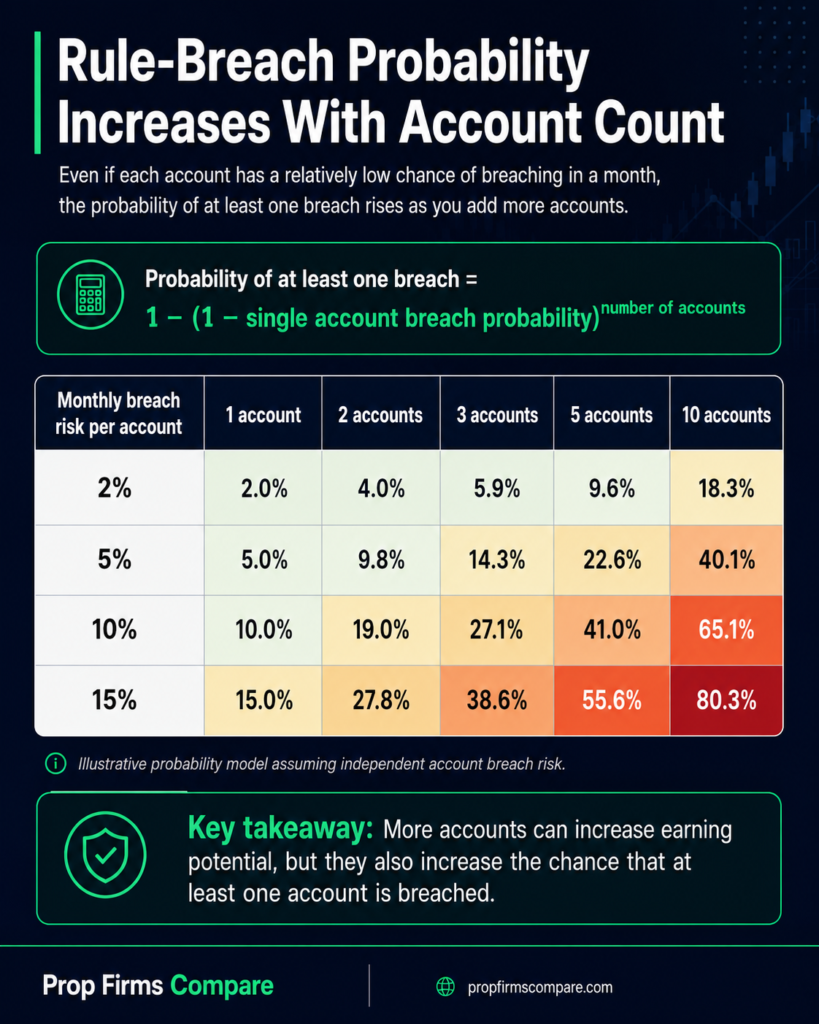
Even if each account has a relatively low chance of being breached in any given month, the probability of at least one account breaching rises as the number of accounts increases.
The formula is:
Probability of at least one breach = 1 − (1 − single account breach probability) ^ number of accounts
Here is a simple model:
| Monthly breach risk per account | 1 account | 2 accounts | 3 accounts | 5 accounts | 10 accounts |
|---|---|---|---|---|---|
| 2% | 2.0% | 4.0% | 5.9% | 9.6% | 18.3% |
| 5% | 5.0% | 9.8% | 14.3% | 22.6% | 40.1% |
| 10% | 10.0% | 19.0% | 27.1% | 41.0% | 65.1% |
| 15% | 15.0% | 27.8% | 38.6% | 55.6% | 80.3% |
This is why “just add more accounts” is not automatically a good scaling plan.
More accounts can increase earning potential, but they also increase the chance that at least one account has a problem. That problem could be a technical issue, a copied order error, a rule misunderstanding, a payout review, a platform mismatch or a drawdown breach.
This is also why traders should not scale from one account to five accounts until their process is boring, repeatable and documented.
If you are still working on consistency, read How to Pass a Prop Firm Challenge before trying to manage a large account stack.
Manual copying vs using a trade copier
Manual execution can work when you only have one or two accounts. It becomes fragile when you have multiple platforms, different logins and fast-moving markets.
Here is a practical comparison:
| Method | Best for | Main advantage | Main risk |
|---|---|---|---|
| Manual execution | 1–2 accounts | Full control over every order | Slow, inconsistent, easy to miss fills |
| Same-platform trade copier | Multiple accounts on one platform | Faster execution and fewer manual errors | Requires correct lot/risk settings |
| Cloud-based trade copier | Multiple accounts across different platforms | Centralised copying, no VPS, broader platform support | Not allowed by every prop firm |
| Separate strategies per account | Traders diversifying firm risk | Reduces identical-trade risk | Harder to manage and review |
| Portfolio approach | Advanced traders | Better capital allocation | Requires strong analytics and discipline |
Traders Connect positions its copier around copying from master to slave accounts with flexible risk settings, including lot size, ratio or equity allocation, plus equity protection, custom trading hours and symbol mapping. Its Copier page also describes real-time trade mirroring, copier logs, account analytics, cross-platform copying and a cloud-based setup with no local software, EAs or VPS required.
If your prop firms allow cloud-based copying, you can test Traders Connect here:
The compliance rule: check before connecting anything
This is the most important section of the article.
You should never connect a trade copier to a prop firm account until you have checked that firm’s current rules. Do not rely on old YouTube videos, Discord comments, Reddit threads or another trader’s setup.
Copy trading can mean several different things:
| Type of copying | Usually lower risk? | Why |
|---|---|---|
| Copying your own master account to your own accounts | Sometimes | Some firms allow it, but often with limits or approval. |
| Copying from another trader | High risk | Often treated as group trading, account management or signal copying. |
| Copying signals from Telegram/Discord | High risk | Many firms prohibit external signal services or third-party strategy copying. |
| Copying between different people’s accounts | High risk | Frequently banned. |
| Copying between your own accounts at the same firm | Depends | Some firms allow it only in specific phases or account types. |
| Cloud copier | Depends | Some firms allow trade copying but restrict cloud-based tools. |
Here are examples of why this matters.
FTMO says its services are for personal use only and states that traders must not allow third parties to access or use FTMO accounts, or cooperate with a third party to perform trades for them. FTMO also warns against risk-management behaviour that is not reasonably replicable in real markets, including substantially larger position sizes or repeated activity that creates higher risk per trade idea.
FundedNext currently says copy trading is allowed between a trader’s own FundedNext Challenge Accounts under specific limits, including a combined capital limit of $300,000 and a master/slave structure. However, the same help-centre page states that using external cloud-based copy trading services, including Traders Connect, is not allowed.
The5ers lists trade coordination or copy trading with other traders or accounts among prohibited trading practices, and also flags third-party EAs where other traders have the same trades open.
Alpha Capital says copy trading is permitted under specific policies. It allows traders to use external accounts as a master, but requires proof of ownership, and says traders must provide master and slave account numbers before copy trading begins. It also says copy trading from cTrader, DX Trade and TradeLocker accounts is not possible at the time of its current help-centre wording.
The lesson is simple: do not ask, “Is copy trading allowed?” Ask a better question:
“Is this exact copier, this exact master account, this exact slave account, this platform, this account phase and this ownership structure allowed by this firm today?”
That is the difference between scaling professionally and accidentally breaching a funded account.
Build an account map before trading
Before you place a trade across multiple accounts, create an account map.
This can be a spreadsheet, Notion table or simple Google Sheet. The goal is to know exactly what each account is, what rules apply and how it should be traded.
Use this structure:
| Field | Example |
|---|---|
| Firm | FTMO, Alpha Capital, The5ers, etc. |
| Account phase | Challenge, verification, funded, payout pending |
| Account size | $50,000 / $100,000 / $200,000 |
| Platform | MT4, MT5, cTrader, DXtrade, Match Trader |
| Copying allowed? | Yes / no / only with approval |
| Master or slave? | Master / slave / manual |
| Risk multiplier | 0.25x / 0.5x / 1x |
| Daily loss limit | Exact figure |
| Max loss limit | Exact figure |
| News trading | Allowed / restricted / banned |
| Weekend holding | Allowed / not allowed |
| Payout date | Date |
| Notes | Any rule exceptions |
Do not trade a multi-account stack from memory. Memory fails under pressure.
A simple account map gives you a control centre. It also protects you from silly errors, such as copying a news trade into an account where news trading is restricted, or copying a swing position into an account where weekend holding is not allowed.
For account selection, link your account map to your research pages. For example:
- Use FTMO Review when checking FTMO rules.
- Use FundedNext Review when checking FundedNext rules.
- Use Alpha Capital Review when checking Alpha Capital.
- Use The5ers Review when checking The5ers.
- Use FTMO vs FundedNext and FTMO vs Alpha Capital if you are choosing between firms.
Use one master decision process
Multi-account trading becomes dangerous when each account has its own emotional decision process.
The professional approach is to have one decision process and multiple execution routes.
That means your master trade idea should answer:
- What setup am I trading?
- What is the entry reason?
- Where is the invalidation level?
- What is the stop-loss?
- What is the target?
- What is the maximum risk per trade idea?
- Which accounts are allowed to receive this trade?
- Which accounts should be excluded because of rules, payout timing or drawdown pressure?
The best multi-account traders do not ask, “How can I place this everywhere?”
They ask, “Which accounts should receive this trade, at what risk, under which rule conditions?”
That difference matters.
For example, if you trade GBP/USD during London session, you may copy the trade to accounts that allow intraday FX trades under normal conditions. But you may exclude an account that is close to daily drawdown, close to payout review, restricted around news, or sitting near a consistency rule.
A copier can help with execution, but it cannot replace the risk decision.
Set risk by account health, not ego
Not every account should receive the same lot size.
The wrong approach is:
“I risk 1% on every account.”
The better approach is:
“I risk based on account phase, drawdown buffer and rule sensitivity.”
Here is a simple account-health model:
| Account condition | Suggested risk multiplier |
|---|---|
| New challenge account with full drawdown buffer | 0.50x–1.00x |
| Account close to phase target | 0.25x–0.50x |
| Funded account before first payout | 0.25x–0.50x |
| Account in drawdown | 0.10x–0.25x |
| Account under payout review | 0.00x–0.25x |
| Account near daily loss limit | 0.00x |
| Rule uncertainty | 0.00x |
This is where many traders go wrong. They keep copying the same risk into every account, even when one account should be protected.
A funded account close to its first payout is not the same as a fresh challenge account. A challenge account can be reset. A funded account with profit due should be protected much more carefully.
Use the Position Size Calculator to calculate trade size before increasing risk, and use the Drawdown Calculator to understand how much recovery is needed after a losing period.
Create a drawdown buffer system
A drawdown buffer is the distance between your current equity and the breach level.
Many traders only track current balance. That is not enough.
For each account, track:
- Current balance
- Current equity
- Daily loss remaining
- Max loss remaining
- Open trade exposure
- Floating drawdown
- Worst-case loss if all stops are hit
The key number is:
Available drawdown buffer after open risk
Example:
| Account | Max loss remaining | Open trade risk | Buffer after trade |
|---|---|---|---|
| Account A | $4,500 | $500 | $4,000 |
| Account B | $2,000 | $500 | $1,500 |
| Account C | $800 | $500 | $300 |
| Account D | $300 | $500 | Not allowed |
Account D should not receive the trade, even if the setup is good.
A copier is powerful because it can execute fast. That is also why settings matter. If the copier sends trades into an account with insufficient buffer, the tool has done exactly what you asked, but the process was wrong.
Use symbol mapping carefully
Symbol mapping is one of the most useful trade copier features, but it is also one of the most important to test.
Different brokers and prop platforms can label the same instrument differently. For example, one platform may use EURUSD, another may use EURUSD.a, another may use a futures symbol, and another may have different contract specifications.
Before using any copier, test symbol mapping with tiny size or demo accounts.
Your symbol-mapping checklist should include:
| Check | Why it matters |
|---|---|
| Symbol name | Prevents trade rejection or wrong instrument copying. |
| Contract size | A “1 lot” position is not always equivalent across products. |
| Minimum lot size | Some accounts may reject very small positions. |
| Maximum lot size | Some accounts may reject oversized positions. |
| Suffixes | Common on MT4/MT5 brokers. |
| Commission model | Affects actual risk and net profit. |
| Spread behaviour | Can differ across platforms. |
| Execution speed | Slippage can vary across accounts. |
Traders Connect lists symbol mapping as part of its copier control features, alongside risk settings, equity protection and custom trading hours.
Protect accounts with trading-hour filters
Not every account should trade every session.
If you trade manually, it is easy to avoid a specific session. If you copy trades, you need the filter built into the process.
Trading-hour filters can help you avoid:
- Illiquid rollover periods
- High-spread market open conditions
- Restricted news windows
- Late-Friday exposure
- Sessions where your strategy performs poorly
- Copying into accounts when you are not monitoring
A useful system is to classify accounts by session:
| Account type | Trading window |
|---|---|
| Evaluation account | Main strategy hours only |
| Funded account before payout | Best session only |
| Swing account | Only firms that allow overnight and weekend holding |
| Futures account | Regular session rules checked separately |
| Recovery-mode account | No copying until stable |
If you trade longer-term positions, review Best Prop Firms for Swing Traders because swing trading requires different rules from scalping or intraday trading.
Do not ignore correlation risk
Correlation risk is one of the most underrated problems in multi-account trading.
If you are long EUR/USD, long GBP/USD and short USD/CHF, you may think you have three different trades. In reality, you may have one large USD exposure.
Across multiple accounts, this can become dangerous.
Example:
| Trade | Direction | Hidden common exposure |
|---|---|---|
| EUR/USD long | Short USD | USD weakness |
| GBP/USD long | Short USD | USD weakness |
| AUD/USD long | Short USD | USD weakness |
| USD/CHF short | Short USD | USD weakness |
If all four trades are copied across five accounts, you may not have 20 independent trades. You may have one large macro bet copied 20 times.
This is why prop firms often care about overexposure, one-sided betting and concentrated risk. FTMO specifically warns against repeated trading activity that creates higher risk per trade idea and cumulative exposure in a symbol or correlated symbols.
A simple portfolio rule:
Do not allow correlated positions to exceed your maximum risk per idea.
So if your max risk per idea is 0.5%, then three USD-correlated trades should share that 0.5%, not each receive 0.5%.
Use analytics across the whole account stack
A prop firm dashboard tells you what happened on one account.
A multi-account trader needs to know what happened across the full stack.
Track these metrics weekly:
| Metric | Why it matters |
|---|---|
| Total stack return | Shows combined performance. |
| Return by firm | Identifies which rules or platforms suit you. |
| Return by account phase | Challenge and funded performance may differ. |
| Max drawdown by account | Shows weakest account. |
| Total open exposure | Prevents accidental over-risking. |
| Win rate by setup | Identifies edge quality. |
| Average R per trade | Better than looking only at win rate. |
| Slippage by platform | Shows execution quality. |
| Rejected copied trades | Highlights technical issues. |
| Missed trades | Shows reliability gaps. |
Traders Connect promotes an Analyzer feature designed to show ROI, win rate, drawdown and heatmaps on copied trades. You can also maintain your own trading journal using the Forex Trading Journal guide.
The correct weekly review process
A weekly review is not just “did I make money?”
For multiple prop firm accounts, your review should answer:
- Did every account follow its rules?
- Did any account receive a trade it should not have received?
- Did all copied trades execute correctly?
- Were lot sizes correct?
- Did any account come close to daily drawdown?
- Did correlated positions exceed the risk plan?
- Were spreads or slippage worse on any platform?
- Which account is closest to payout?
- Which account should be protected next week?
- Which account should be paused?
Create a weekly table:
| Account | Weekly P/L | Max DD | Rule issues | Copier issues | Next action |
|---|---|---|---|---|---|
| Account A | +1.2% | 1.1% | None | None | Continue |
| Account B | -0.8% | 2.3% | None | One missed copy | Reduce risk |
| Account C | +3.5% | 0.9% | Near target | None | Protect profit |
| Account D | -2.0% | 3.9% | Near daily limit | None | Pause |
This turns trading into account management, not emotional reaction.
When not to copy trades
Sometimes the best copy setting is “off”.
Do not copy trades when:
- You have not verified the firm’s current rule.
- The account is close to daily drawdown.
- The account is near payout and the trade is not necessary.
- The strategy is in a losing streak.
- You are trading news and the firm restricts it.
- Symbol mapping has not been tested.
- The account is on a different platform with different contract sizing.
- You are copying from another trader.
- You are unsure whether the firm allows your exact setup.
This is especially important for funded accounts. A trader who has already earned a payout should not treat that account like a fresh challenge.
Your goal is not to copy every trade everywhere. Your goal is to protect the accounts that matter most.
Suggested multi-account scaling plan
Here is a practical progression.
Stage 1: One account
Trade one account manually or with a simple execution process. Focus on consistency, journalling and rule discipline.
Recommended resources:
Stage 2: Two accounts
Add a second account only if you can follow rules consistently. Do not immediately double your risk. Use lower risk until the process is proven.
Stage 3: Three to five accounts
At this stage, manual execution becomes harder. You need an account map, risk multipliers, weekly review, platform checks and clear rules for which accounts receive trades.
If the firms allow cloud copying, this is where a tool such as Traders Connect becomes useful.
Manage your allowed accounts with Traders Connect:
Stage 4: Portfolio management
Once you manage more than five accounts, you are no longer just trading. You are managing a small trading operation.
At this stage, you need:
- Rule documentation
- Trade copier logs
- Risk dashboard
- Payout calendar
- Account health scoring
- Correlation tracking
- Strategy-level analytics
- Separate treatment for challenge and funded accounts
You should also consider whether more accounts are actually improving your risk-adjusted return.
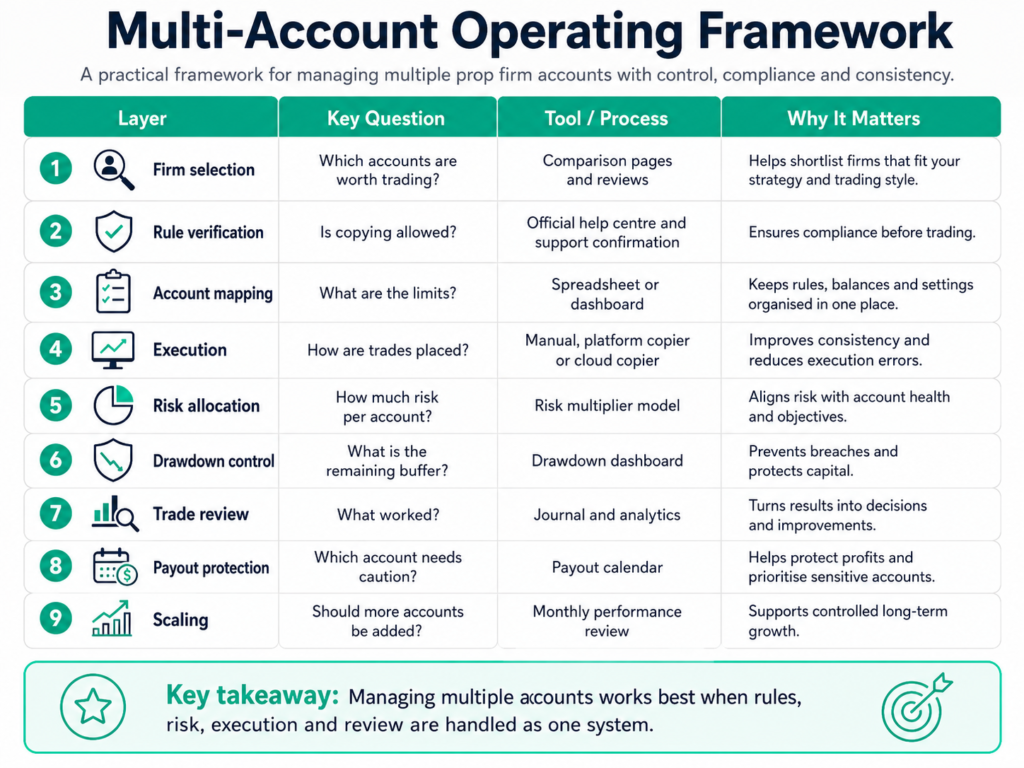
The multi-account operating framework
Use this framework as your linkable reference model:
| Layer | Question | Tool/process |
|---|---|---|
| Firm selection | Which accounts are worth trading? | Comparison pages and reviews |
| Rule verification | Is copying allowed? | Official help centre and support confirmation |
| Account mapping | What are the limits? | Spreadsheet or dashboard |
| Execution | How are trades placed? | Manual, platform copier or cloud copier |
| Risk allocation | How much risk per account? | Risk multiplier model |
| Drawdown control | What is the remaining buffer? | Drawdown dashboard |
| Trade review | What worked? | Journal and analytics |
| Payout protection | Which account needs caution? | Payout calendar |
| Scaling | Should more accounts be added? | Monthly performance review |
This table is worth turning into a custom graphic for backlinks. A lot of traders talk about passing challenges, but very few explain the operational structure needed to manage multiple funded accounts properly.
Common mistakes when managing multiple prop firm accounts
1. Copying before checking rules
This is the most dangerous mistake. A copier can be technically perfect and still violate a firm’s policy.
2. Using the same lot size everywhere
Different accounts have different balances, drawdown buffers and trading conditions. Same lot size does not mean same risk.
3. Treating challenge accounts and funded accounts the same
A funded account close to payout should usually be protected more than a new challenge account.
4. Ignoring symbol differences
A copied trade can fail or copy incorrectly if symbol names, suffixes or contract sizes are not configured properly.
5. Copying correlated trades
Multiple trades can create one large hidden exposure.
6. Trading during restricted events
Some firms restrict news trading, weekend holding or specific high-volatility strategies.
7. Not reviewing copier logs
If a trade fails to copy, copies late, copies with the wrong lot size, or is rejected, you need to know quickly.
8. Scaling too early
If you cannot manage one account calmly, multiple accounts will amplify your weaknesses.
How to choose the right prop firms for multiple accounts
The best firm for a single account is not always the best firm for a multi-account setup.
When choosing firms, prioritise:
| Factor | Why it matters |
|---|---|
| Rule clarity | You need to know exactly what is allowed. |
| Copy-trading policy | Essential if using a copier. |
| Platform support | Affects execution and copier compatibility. |
| Drawdown model | Determines account survival. |
| Payout reliability | Matters more once funded. |
| Scaling plan | Helps long-term account growth. |
| Country eligibility | Especially important for UK and US traders. |
| Trading style fit | Swing, scalping, news and futures all need different rules. |
Start with:
- Best Prop Firms
- Best Cheap Prop Firms
- Best Instant Funding Prop Firms
- Best Prop Firms for UK Traders
- Compare Prop Firms Side by Side
Should you use Traders Connect for prop firm accounts?
Traders Connect can be useful if you manage multiple accounts and your firms allow your exact copy-trading setup.
Its main advantages are:
- It can mirror trades across multiple accounts.
- It supports several popular trading platforms.
- It offers risk controls such as lot size, ratio or equity allocation.
- It includes equity protection, custom trading hours and symbol mapping.
- It is cloud-based, meaning you do not need to run a local VPS or EA setup.
- It provides copier logs and account analytics.
But it is not a universal solution.
Do not use it blindly with every firm. Some firms may allow copy trading only with internal accounts. Some may require approval. Some may allow VPS-based copying but not cloud-based copying. Some may ban copying between accounts entirely.
The safest approach is:
- Check the firm’s official copy-trading rule.
- Contact support with your exact intended setup.
- Ask for written confirmation.
- Start with one test account.
- Use low risk first.
- Review copier logs daily.
- Keep screenshots and confirmations.
If the firm confirms your setup is allowed, Traders Connect can make the day-to-day management of multiple accounts much cleaner.
CTA: Check Traders Connect here: /go/traders-connect/
Final checklist before trading multiple accounts
Before you place your first copied trade, complete this checklist:
| Checklist item | Done? |
|---|---|
| Every account is listed in your account map. | ☐ |
| Every firm’s copy-trading rule has been checked. | ☐ |
| Any required support approval has been received. | ☐ |
| Master and slave accounts are clearly defined. | ☐ |
| Risk multiplier is set per account. | ☐ |
| Symbol mapping has been tested. | ☐ |
| Minimum and maximum lot sizes are checked. | ☐ |
| Trading-hour filters are configured. | ☐ |
| News restrictions are documented. | ☐ |
| Weekend holding rules are documented. | ☐ |
| Drawdown buffer is tracked. | ☐ |
| Copier logs are reviewed after test trades. | ☐ |
| Payout dates are tracked. | ☐ |
| Weekly review process is scheduled. | ☐ |
If you cannot tick all of these, you are not ready to scale.
Final verdict
Managing multiple prop firm accounts can be a smart way to scale, but only if you treat it like an operation rather than a shortcut.
The traders who survive long term usually do three things well:
They know the rules.
They control total risk per trade idea.
They use tools to reduce execution errors without outsourcing responsibility.
A trade copier such as Traders Connect can be useful when the firm allows it, especially for traders managing several accounts across different platforms. But the copier is only one part of the system. The real edge comes from account selection, rule verification, drawdown control, risk allocation and consistent review.
Before adding another account, ask yourself:
Can I manage the account I already have without breaking rules?
If the answer is yes, build the system slowly.
If the answer is no, more accounts will not solve the problem. They will only multiply it.
FAQs
Yes, many traders operate more than one prop firm account, but each firm has its own rules on maximum allocation, account ownership, copy trading, platforms and prohibited strategies. Always check the rules before buying or trading.
It depends on the firm. Some allow copying between your own accounts under strict limits. Some require approval. Some restrict third-party or cloud-based tools. Some prohibit group trading or copying from other traders entirely. Always verify the exact setup with the firm.
Only if the prop firm allows your exact setup. Traders Connect can copy trades across supported platforms and accounts, but the prop firm’s rules come first. If a firm prohibits cloud-based copiers or requires approval, follow the firm’s rule.
There is no universal number, but many multi-account traders reduce risk as account count increases. Instead of thinking only in risk per account, calculate total risk per trade idea across all accounts.
No. Some accounts should be excluded depending on drawdown, payout timing, news restrictions, platform differences or account phase. The goal is controlled allocation, not copying every trade everywhere.
The biggest risk is a single mistake affecting every account at once. This can happen through incorrect lot sizing, rule breaches, symbol-mapping errors, correlated exposure or copying trades into accounts that should be paused.
Use an account map, position size calculator, drawdown calculator, trading journal, payout calendar and weekly review dashboard. A copier helps with execution, but risk management still needs a process.